01
Branded QR upload page
Your business name, colours and style stay front and centre. Guests upload to your private collection page, not to a public gallery.
SecondFrame gives wedding photographers a private, branded way to collect guest photos and video clips directly into their own dashboard.
You review everything. You curate the good stuff. You ignore the rubbish. Then you decide what becomes part of the final story.
It is not “more work”. It is a photographer-controlled add-on you can sell, automate and profit from.
Upload your favourite moments from today. They go privately to the photographer for review.
Most QR wedding gallery apps are designed for couples to share images with each other.
SecondFrame is designed for photographers, videographers and wedding creatives who want to collect guest content privately, curate it professionally and turn it into a controlled add-on service.
SecondFrame is not a couple-facing gallery system. It is a photographer-controlled add-on that helps you collect more moments, protect your brand and create extra value around every wedding.
Your business name, colours and style stay front and centre. Guests upload to your private collection page, not to a public gallery.
Create a client-facing sales page you can link from your own website, pricing guide or enquiry emails. It explains the add-on and helps couples ask for it.
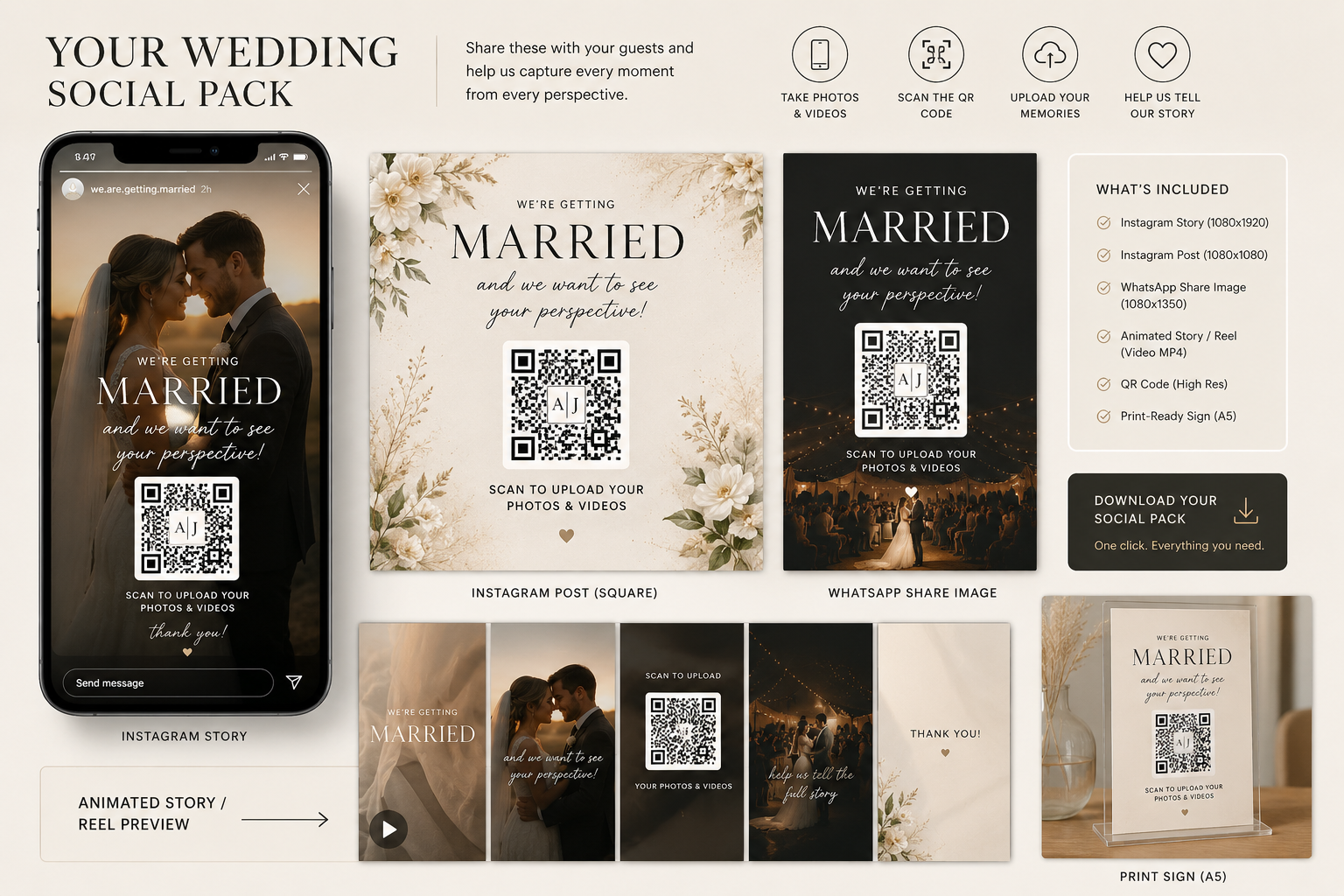
Generate ready-to-share graphics for your couple so they can ask guests to upload their photos and videos before, during and after the wedding.
Download branded QR cards and advertising posters for tables, welcome signs, bars, dance floors, wedding fairs or venue displays.
Create short personalised QR videos for iPads, tablets, venue TVs or projector screens so guests actually notice the upload link.
Guests submit. You review, curate, download, edit and decide what belongs in your final delivery. Nothing goes public unless you choose it.
One event creates the tools you need: the upload page, QR code, event card, social pack, posters and display video. Guests upload privately, and you decide what gets used.
Add the couple, date and your branding. SecondFrame creates the private guest upload page and QR link.
Use the QR on event cards, posters, social posts, WhatsApp messages, iPads, venue screens, menus and wedding fair displays.
Guests upload directly to you. You review, download, edit and deliver only what belongs in your brand.
The Guest Media Page gives every photographer a branded sales page they can link from their own website, pricing guide, brochure, enquiry emails or wedding fair materials.
Use it as a page, button, pricing link or wedding fair QR code.
They see why guest photos matter, how the upload works and why it is still controlled by you.
Reply, invoice and book it like any other service you offer.
Share the QR codes, social pack, posters and venue display assets.
Whether you shoot photos, video or social content, this gives you access to the moments you missed — ready to curate, edit and deliver your way.
Collect guest angles, reactions, dance floor chaos, phone snaps and candid moments that your professional cameras could not be everywhere to capture.
Collect short guest video clips, testimonials, speeches, reactions and behind-the-scenes footage alongside guest photos.
Gather real guest-created moments in one branded place, then turn them into reels, stories, recap edits and social-first wedding content.
No account. No app. No confusing gallery login.
The page explains that their photos go to the photographer for review.
A clear success message encourages more uploads later.
See everything guests sent, without giving them access to a public gallery.
Keep the useful moments and ignore the duplicates, screenshots and blurry nonsense.
Edit, curate and package the best content as part of your own creative service.
The strongest pitch is not storage. It is extra value. Offer couples a branded Guest Photo Package and use SecondFrame to collect the content with almost no manual admin.
Start using this on my next weddingStart with a real event or a test wedding. Add your brand, download the QR, create the social pack and see exactly how it feels from the guest’s phone.
Everything you need to know before getting started.
Our pricing is very simple and transparent. No subscriptions, no contracts, no tie-ins. Completely Pay-As-You-Go. £10 per wedding for photo collection. £20 per wedding if you want to include video clips.
SecondFrame is not for the wedding couple, it is for you. The couple do not see any images that you have not already curated. No more galleries full of blurry dance floors, no more selfies of Nan's forehead, no screenshots and nothing inappropriate being shown publicly. Everything is available to you first. You can download the images, curate, edit and blend them into a cohesive package.
No. The upload page is for submission only. Guest photos and videos go to the photographer or creative for review and curation.
Yes. The event upload page, QR materials, social media pack, posters and venue display assets are designed to carry your business name, colours and visual style if you want them to.
No. SecondFrame is built for wedding creatives: photographers, videographers and content creators. Photo and video uploads make it useful for anyone who wants to collect guest-created wedding content while staying in control.
We make it easy. From your dashboard you can create a branded and personalised Guest Media Page that sells the idea for you. Click here to see an example. You could position it as a Guest Photo Package. The couple gets more of the story, while you keep quality control and decide what is worth delivering.
The social media pack gives your couple ready-to-share graphics that ask guests to upload their photos and videos. It helps you promote the QR link without writing fresh posts or designing extra assets every time.
No. Some users are completely digital: displaying QR codes on iPads, tablets or venue TV screens, sending QR codes direct to couples for WhatsApp, Facebook and Instagram, or letting couples add the QR code to their own printed items. Physical print is useful, but not essential.
Yes. You can save the event QR code and drop it straight into any Canva design. Canva also allows physical print orders straight from your phone.
Yes. This is one of the easiest ways of putting your event QR code in front of guests. You can use blank postcards, online print services, Canva, VistaPrint, Solopress or any print supplier you already like.
Yes. SecondFrame can produce a short personalised video with the couple’s name and unique event QR code for you to loop on a tablet, iPad or venue TV screen. Put it somewhere visible and guests are far more likely to use it.